<
" Welcome to Indo Pinoy"

Wednesday, April 4, 2012

Instagram for Android now available for download

Instagram for Android now available for download

One of the things that got some people going for iOS devices are the apps and one of the apps that people are flocking to is Instagram. After a long wait, Android users no need to envy further as the beloved photo sharing app is now available in the Google Play Store.


If you’ve been living under a rock, Instagram is a photo sharing app that lets you capture images, apply cool effects then share it with other Instagram users. You can also view images uploaded by your followed friends, giving you a chance to like it or post a comment.

It was rumored that the Android version will be better than its iOS counterpart so I did a quick comparison.

Turns out, the Android version is missing a feature that its iOS brother has and that is the selective focus tool. With the filters, I managed to spot a difference and that is the X-Pro. Android has “X-Pro” while the iOS version has “X-Pro II.”


The Instagram app for Android has been made available on April 3, 2012 and at the time of writing, already been rated by 8,000 users.
It’s in version 1.0.0 and requires Android version 2.2 and up. Searching the word “Instagram” on the Play Store won’t quickly show you the app so to make it easier you can download it through this Play Store link.

Note: Android phone used is the Sony Xperia S.

source & image credit: http://www.yugatech.com/

Tuesday, April 3, 2012

NFC Technology in iPhone 5

NFC Technology in iPhone 5

Apple’s iPhone 5 is reportedly set to launch this summer. This smartphone will feature a new technology known as Near Field Communication (NFC).

Rumor: iPhone 5 to get NFC

With the NFC technology, the new iPhone 5 can be used as a credit or debit card in making payments anywhere throughout the world.

It’s been said that Apple will come into partnership with MasterCard or Paypass in order to incorporate the NFC technology into the iPhone 5. Reports said this information was provided by the developer who is working on the NFC technology. NFC technology can help a person make mobile transactions online and offline.

Near Field Communication technology

NFC is a chip that allows wireless transfer of information. By default, this chip will store the information of a credit or debit card. It will also store allegiance credits and points because it would ultimately go to call iTunes’s revamp. It is needless to say that the development of an in-depth application purely based on speculative hardware capabilities could be a risky move. However, the developer is confident about developing the NFC technology.

The integration of NFC technology with sim cards will help mobile phone operators insert NFC services directly into it. Additionally, NFC technology offers RFID (Radio-Frequency Identification) and payment transactions with just a simple touch.

The NFC technology in the iPhone 5 will be extremely easy to implement in a day to day life, like the usage of iWallet by iTunes as Apple had reportedly already accumulated over 200 million credit cards through the iTunes store.

Ed McLaughlin of MasterCard had already given some weight on rumors for the NFC technology on the iPhone 5. With the reported new iPhone 5 specifications such as a faster processor, 10-megapixel camera, aluminum back cover, Siri to be named ‘Assistant’, the added NFC technology will help the upcoming phone to become one the best smartphones ever.

An advantage of NFC technology is that users don’t have to carry money everytime. This technology will work similarly like Apple’s eWallet but with more security features.

Some of the features of NFC:
  • Intuitive: A simple touch can start NFC interactions.
  • Open and standards-based: The under development NFC technology implements standards like ISO, ETSI and ECMA.
  • Versatile: NFC will suits for broader range of environments and industries.
  • Technology-enabling: NFC facilitates simple and fast setup of wireless technologies like bluetooth a wi-fi.
  • Interoperable: NFC will support existing contact less card technologies.
  • Security-ready: NFC has built in capabilities of application security.
  • Inherently secure: More powerful security is made for transactions.

Rumors about the NFC on the iPhone 5 have surfaced, but Apple remains mum over the NFC technology and its launch with the iPhone 5. Unless and until Apple officially gives confirmation, we can only wait and see.

Fans of Apple products like the iPhone and iPad will definitely welcome the NFC technology in the iPhone 5 as it will make life even easier.


Photo credit: www.cultofmac.com
Source: CoolBuster.net
 

Sunday, April 1, 2012

Why New Mac Users Need Parallels Virtualization Software ?

Why New Mac Users Need Parallels Virtualization Software ?

So you’ve bought a Mac. You’ve entered the sacred clan of Apple. Now what? How do you function in a world so cluttered by Microsoft? How do you access your old Word documents, your Excel files, and your PowerPoint presentations? What happens to all the software you’ve invested in over the years? Do you just start from scratch?

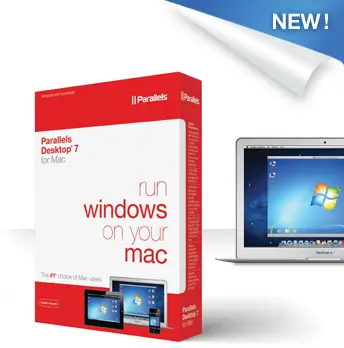
No. This is why the computer geniuses of the world created parallels. What’s a parallel? A parallel is a way to run Windows applications on your Mac. It is one of the famous desktop virtualization software for Mac computers. It is a program that translates what you already have set up on your Windows computer and makes it easy to use on your new Mac. That way, both Mac and Windows software can run simultaneously.
Not only do parallels allow you to maintain your software, they also let you become slowly accustomed to your new Mac. There are many differences in Mac software versus Windows, and a parallel allows you to add in new learning experiences a little at a time instead of being immediately inundated by all new programs. This will allow you to keep up your productivity, even in the midst of such a drastic change.

Additionally, parallels are vital when it comes to issues like virtual private networks. VPNs often run with Windows-only applications, so having a Mac could leave you cut off. Avoid this issue by adding parallels.
One of the benefits of owning a Mac is the ability to run the Mac favorite OS, Snow Leopard, and have the ability to run others, such as most versions of Linux and really all versions of Windows. Sure, you can use Boot Camp, which has been shipping as part of the Mac OS for some time, and simply boot Windows separately; however, most of the time it may make more sense to run Windows and OS X simultaneously.

Times like when the Mac version of Adobe’s CS suite is running, and perhaps some Mac exclusive software, but you still need to work with Windows only software, such as Visio, Visual Studio, or SQL.

There are different type of compatibility programs, with VMware and Parallels being the most popular. VMware does get the job done; however it does have issues. If you use Microsoft’s Virtual PC (for Windows), and have to move virtual images into your Mac so you can work and explore at home or on the go, you would be unable to move the images and use them with VMware. Parallels, however, is able to recognize and accept images that have been used with Virtual PC without any issues. Parallels accepts every single OS and configuration without issues, the only thing you might run across is that many of virtual images asked to be reactivated or at times even for the product key; which was not a problem since you should have that information.

Not only is Parallels able to recognize those images, but it also takes more advantage of the Mac’s hardware, such as the GPU (graphics); therefore, resulting in better CPU performance – not really slowing down the virtual machine nor the native OS.

VMware and Parallels both get the job done; however, if you’re in the technology industry and need to move virtual images from computer to computer often, than Parallels would be the best choice. Parallels are a very useful tool for new Mac owners, especially if you’ve never had or used a Mac before. Do your research and find out which system will work best for your needs.

source & image credit: http://www.sysprobs.com/

Thursday, March 29, 2012

Playstation 4 “Orbis” arriving in 2013

Playstation 4 “Orbis” arriving in 2013

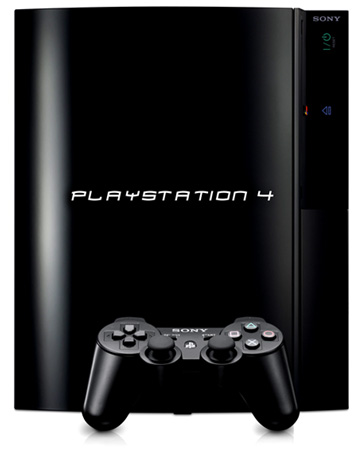
Gamers will certainly keep their hopes up that 2012 is not the end of the world, with Nintendo releasing Wii U this year and Microsoft’s next Xbox “Durango” already in the works. Information has leaked that the next Playstation, codenamed “Orbis”, will be released during the holiday period of 2013.

Kotaku sources revealed that the next Playstation will carry an AMD x64 CPU and an AMD Southern Islands GPU. Such specs will allow the “PS4” to display games at an output of up to 4096 x 2160, which can be considered as 4K resolution. This should play well with Sony’s home theater projectors capable of displaying a 200-inch diagonal screen across your living room.

Image Credit: http://www.yugatech.com
Playstation 3 owners with huge collection of games won’t rejoice that much as the Orbis won’t offer backwards compatibility with PS3 games. New games for the PS4 will be available either in Blu-Ray or as a PSN download. This also means no more used games as every game purchased must be locked to a single PSN account.

It was also hinted that Sony’s latest handheld, the Vita, will play a vital role with the PS4. With the word Orbis, which is Latin for circle, or ring, combined with Vita or Vitae which is Latin for life, will give you the phrase “Circle of Life”. Coincidence or Sony has a penchant for wordplay?

Sony has declined to comment about the information, citing its policy not to comment on “rumors or speculation”, meaning these things should be taken with a grain of salt. But between the end of the world and the PS4 rumor? I’d choose the latter. What do you guys think?


Our Some Major Sources
ABS-CBN News
Inquirer.net
Phil Star
Bida Kapamilya
IamJammed
Showbiznest